Cryptology
Notes connecting Base64 encoding, asymmetric encryption and digital signatures with HTTPS.
- Written
- Published
- Updated
Cryptology
Base64
At the same time, base64 is a costly instrument. Base64 encoding causes an overhead of 33–37% relative to the size of the original binary data (33% by the encoding itself; up to 4% more by the inserted line breaks).
Base64 encodes binary data (like images, files, or raw bytes) into a string made of printable ASCII characters.
The particular set of 64 characters chosen to represent the 64-digit values for the base varies between implementations.
This is the Base64 alphabet defined in RFC 4648 §4:
A-Z, a-z,0-9,+,/,=
- Variants like URL-safe Base64 may replace
+,/with-and_. =is used for padding sign.
It just goes through the original binary stuff, splits it into chunks of 6 bits, and converts every chunk into a safe textual character (or, strictly speaking, a binary sequence that represents such a character).
Thus, , one chunk is unique corresponding to one character in Base64 alphabet.
Since 3bytes = 24bits and can be divided by 6. Thus we can group by 3byte.
Thus each 3bytes is corresponding to 4 chunks of 6bits. If there are not fully 3bytes, then fill it to zero until 3bytes.
And if all bits of chunk are filled by zero we replace with = , since it is not original data.
NOTE:
Base64 just encodes, it doesn’t secure or encrypt your data. Anyone can decode it easily.
Asymmetric encryption
Asymmetric encryption (also called public-key cryptography) is a type of encryption that uses two different but mathematically related keys:
-
Private key — kept secret by the owner.
-
Public key — shared freely with others.
Unlike symmetric encryption, where the same key is used to encrypt and decrypt, asymmetric encryption uses a key pair with distinct roles:
1. Encryption
- The sender uses the recipient’s public key to encrypt the data.
- Only the recipient’s private key can decrypt it.
2. Decryption
- The recipient decrypts the ciphertext with their private key.
That means even if someone intercepts the message, they can’t decrypt it without the private key.
So everyone with public key can encrypt. But only private key can decrpypt it.
Digital signature
Digital signatures use public-key cryptography (asymmetric encryption).
However in a digital signature, the process is reversed on purpose.
Here’s the basic process:
- Signing
- The signer runs the document through a hash function, producing a fixed-length value called a hash (a unique fingerprint of the document).
- The signer encrypts the hash using their private key.
- The result is the digital signature.
- Verification
- The receiver uses the signer’s public key to decrypt the signature, revealing the original hash.
- The receiver also computes a new hash of the received document.
- If both hashes match. The document is authentic and unchanged.
- If not. The document was altered or the signature is fake.
Alice signs (Encrypt) a document with her private key → anyone can verify (Decrypt) it with her public key, but no one else can forge her signature. Since one other one have private key.
HTTPS
ACME = Automated Certificate Management Environment, It is a communication protocol designed for automatically obtaining browser-trusted certificates.
This is accomplished by running an ACME client on a web server.
ACME Account
That client contacts CA, for example, Let’s Encrypt, discovers its API endpoints, and registers an account if one doesn’t already exist.
That client first will generate a pair of keys for authenticating cilent requests to the CA.
Then it sends a request to create an ACME account to CA Let's Encrypt. And this request also contain the public key for signature process.
So now subsequent requests for client can use private key to signature, and CA uses public key to verify.
At this point, the CA knows:
“This request comes from the holder of this ACME account’s private key.”
It doesn’t yet know whether that account controls our domain like isaber.top. That is the next step.
Chanllenge
The server sends a signed HTTPS request to CA asking for a certificate covering a domain.
Before give it certificate, the CA should confirm the that ACME account i.e., the server has the control of domain isaber.top.
The Let’s Encrypt CA will look at the domain name being requested and issue one or more sets of challenges.
There are different ways that the client can prove control of the domain. For example, the CA might give the client a choice of either:
- Provisioning a DNS record under
example.com, or - Provisioning an HTTP resource under a well-known URI on
http://example.com/
External image · letsencrypt.org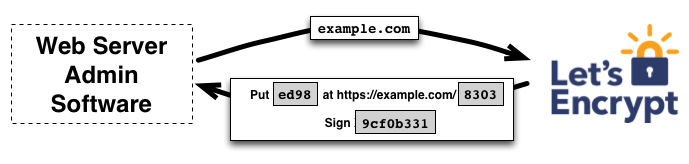
Once the client has completed these steps, it notifies the CA that it’s ready to complete validation.
Then, it’s the CA’s job to check these challenges.
If the response matches, domain authorization succeeds.
Certificate Issuance
First, the server should generate another pair of keys to authenticate the website during visitors’ TLS connections.
The client constructs a PKCS#10 Certificate Signing Request (CSR) that asks the Let’s Encrypt CA to issue a certificate for isaber.top with that website public key.
Certificate Signing Request
├── Requested domain: isaber.top
├── Website public key
├── Signing algorithm
└── Signature made with the website private key
But It does not prove domain control—the earlier challenge handled that. So the final request has two signatures
ACME request
├── Payload: CSR
│   ├── Domain and website public key
│   └── Signature using WEBSITE private key
└── Request signature using ACCOUNT private key
The CA creates an X.509 certificate, containing information such as:
Domain names:       isaber.top
Website public key: ...
Issuer:             the issuing CA
Serial number:      ...
Validity period:    ...
Allowed key uses:   ...
CA signature:       ...
The CA signs the certificate’s contents using its own issuing private key, typically belonging to an intermediate CA.This signature lets others verify that the issuer approved those exact certificate contents.
The three signing roles are worth keeping separate:
| Signature | Private key used | Who verifies it? |
|---|---|---|
| ACME request | Account key | CA |
| CSR | Website key | CA |
| Issued certificate | CA’s issuing key | Browser, when building the trust chain |
Certificate Chain
A certificate chain connects your website’s certificate to a certificate authority that the browser already trusts. An intermediate certificate is a link in that chain.
Each certificate contains its subject’s public key.
THIS IS CRUCIAL FOR CHAIN TO WORK.
A typical chain has three levels:

Root CA certificate
    │
    │ Root CA signs the intermediate certificate
    ▼
Intermediate CA certificate
    │
    │ Intermediate CA signs your website certificate
    ▼
Website certificate: isaber.top
A root certificate contains the root CA’s public key. It is usually self-signed: the root CA signs its own certificate.
The root CA authorizes another CA to issue certificates by signing an intermediate CA certificate.
Since Each certificate contains its subject’s public key. So we can complete verifying that chain.
Starting with a root it already trusts, the browser can verify:
Trusted root public key
    └── verifies intermediate certificate
            └── intermediate public key
                    └── verifies website certificate
                            └── website public key
Browser Connection
Once server has the certificate, it stores it with the website’s private key and is ready to accept HTTPS connections.
Suppose someone opens https://isaber.top. We’ll follow a fresh TLS 1.3 connection over TCP.
1. The browser reaches your server
The browser resolves isaber.top through DNS, then establishes a TCP connection to port 443.
2. The browser sends ClientHello
This message advertises supported TLS versions and algorithms, identifies the requested hostname, and includes a temporary key share.
Server responds with ServerHello, selecting compatible parameters and providing its own key share.
3. Both sides derive handshake encryption keys
Using their temporary private values and the exchanged public key shares, they independently calculate the same shared secret.
They derive encryption keys from that secret and the handshake history. The shared secret is never sent across the network.
In TLS 1.3, the remaining handshake messages are encrypted. TLS 1.3 handshake
4. Server presents its identity
Inside the encrypted handshake, server sends:
Certificate: its website certificate and intermediate chain.CertificateVerify: a signature over handshake information, made using the website’s private key.
The browser checks that the certificate covers isaber.top, is valid, and chains to a trusted root. The handshake signature proves that this connection’s server possesses the matching private key. Server authentication, CertificateVerify
5. They finish the handshake
Both sides exchange Finished messages, verifying the handshake’s integrity and possession of the derived secrets. Application traffic uses separately derived traffic keys. Finished messages
6. The browser sends HTTP through TLS
The browser can now send a request such as:
GET / HTTP/1.1
Host: isaber.top
TLS encrypts the HTTP request—including its headers—and protects it against tampering. Caddy decrypts it, processes or forwards it, and encrypts the response. HTTP over TLS
The key distinction is:
| Cryptographic material | Job |
|---|---|
| Certificate and website key pair | Authenticate the server |
| Temporary key-agreement values | Establish a shared secret |
| Derived symmetric traffic keys | Encrypt and protect HTTP traffic |
The website’s certificate key does not directly encrypt your page or password in this TLS 1.3 handshake. Authentication and traffic encryption have separate roles.
Summary
The certificate is used to insure the website public key does come from the domain.
And then website public key is used to insure the server on that domain does has private key which means it is the correct server.
The browser checks two things:
- Certificate verification: “A trusted CA has certified that this public key is authorized for isaber.top.”
- Handshake signature verification: “The server I’m connected to possesses the matching private key.” The browser establishes this by using the certified public key to verify server’s signature over the current handshake.
Together:
Trusted certificate → Public key is authorized for this domain.
Valid handshake signature → Connected server possesses the matching private key.
Both pass → Server is authenticated for this domain.
Comments
No approved comments yet.
Your display name and plain-text comment become public only after owner approval. No account or email is required.